So about a week ago my Blackberry (8900) booted to a screen stating “Error [some number I can’t remember]: Reload OS”, obviously not good. So I broke out JLcmder (a must have for all hard core Blackberry hackers), and proceeded to wipe and OS and reload my BB. Yesterday afternoon I am sitting at my desk and I look down at my Blackberry and it is sitting there with a white screen, nothing but a white screen. I try a soft reboot, and back to the white screen, I try a battery pull, back to the white screen. Then in not my finest moment I some how rationalize that running over to the T-Mobile store will be the easiest/quickest fix, they waste a solid 30 mins of my life pulling the battery repeatedly and praying that it will boot, I will never get that 30 mins back. As usual I returned to the office hooked the BB up to a laptop to see if I could connect from JLcmder, no luck. I removed the battery, sim card and my MicroSD memory card, replaced the battery and rebooted, my BB returned. I then stated scouring the forums, turns out that a few others had seen an issue with a corrupted SD card that caused the white screen of death. Last night I formatted my SD card (fat32) and placed it back into my BB and the phone booted fine (happy about that). When will I realize to never call my carrier for technical support (I have been with Verizon, AT&T and now T-Mobile and they are all the same. When you go to a BB specialist and the first thing they tell you do is pull your batter, you have to wonder how special he or she is.) Hope this helps someone.
Yearly Archives: 2009
What have I been up to… Project Hive…
Obviously my post frequency has dramatically decreased this is due to a couple of factors. First I am busy so I have less time to turn my experiences into easy to digest blog posts and second myself and a few of my comrades have been developing something we call “Project Hive” . As you can probably tell from many of my blog posts most of my work in recent years has been associated with EMC technologies. Throughout the years we realized that while there are some good framework tools out there they are costly, require significant customization and often don’t solve the common day-to-day operational issues that system administrators face. The goal of “Project Hive” is to dramatically simplify the common tasks associated with managing EMC technologies. Being intimately familiar with these tasks we have developed a platform that is based on a distributed collection, aggregation and presentation, we call this the “Honeycomb”, each Honeycomb contains modules, we call these “Workers” which are responsible for the collection, aggregation and analysis of data from discrete infrastructure components, all workers are centrally managed on the Honeycomb and use standard based methods to collect data (i.e. – WMI, SSH, SNMP, APIs, etc…). “Project Hive” is a very active project and we are continually adding functionality to existing workers and building new workers as time permits or requirements dictate.
Any EMC customer who has been through an upgrade is familiar with the EMCGrab process (the process of running the EMCGrab utility on each individual SAN attach host within the environment and providing the output to EMC so they can validate the host environment prior to the upgrade).
In a reasonably sized environment this process can be tedious and time consuming, one of our released workers centralizes and automates the EMCGrab process. I recently created a video which contrasts the process of running an EMCGrab manually on an individual host vs. using the Hive Worker. My hope is to publish more of these videos in the future but as you can imagine they take a bit of time to produce. If you are looking for more information contact the Project Hive team at dev@projecthive.info
A hi-resolution video is available here .
Share and Enjoy
EMC CX3-80 FC vs EMC CX4-120 EFD
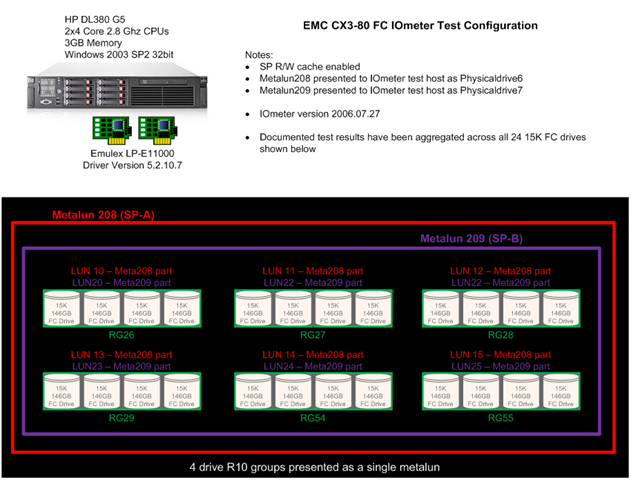
This blog is a high level overview of some extensive testing conducted on the EMC (CLARiiON) CX3-80 with 15K RPM FC (fibre channel disk) and the EMC (CLARiiON) CX4-120 with EFD (Enterprise Flash Drives) formerly know as SSD (solid state disk).
Figure 1: CX4-120 with EFD test configuration.
Figure 2: CX3-80 with 15K RPM FC rest configuration.
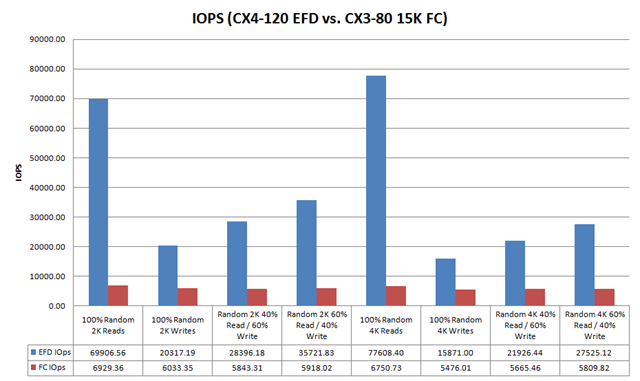
Figure 3: IOPs Comparison
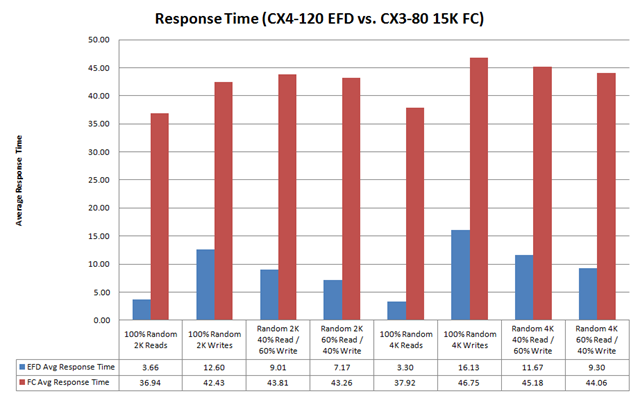
Figure 4: Response Time
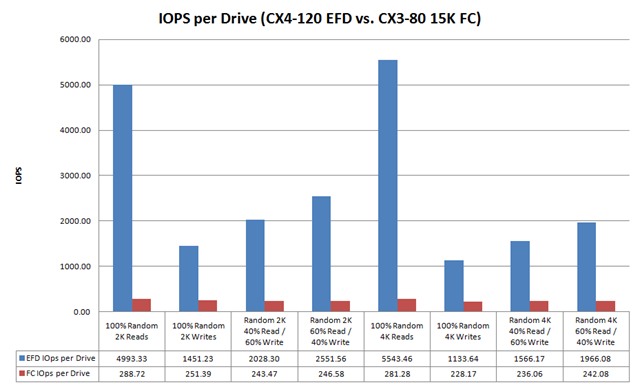
Figure 5: IOPs Per Drive
Notice that the CX3-80 15K FC drives are servicing ~ 250 IOPs per drive, this exceeds 180 IOPs per drive (the theoretical maximum for a 15K FC drive is 180 IOPs) this is due to write caching. Note that cache is disabled for the CX4-120 EFD tests, this is important because high write I/O load can cause something known as a force cache flushes which can dramatically impact the overall performance of the array. Because cache is disabled on EFD LUNs forced cache flushes are not a concern.
Table below provides a summary of the test configuration and findings:
| Array | CX3-80 | CX4-120 |
| Configuration | (24) 15K FC Drives | (7) EFD Drives |
| Cache | Enabled | Disabled |
| Footprint | ~42% drive footprint reduction | |
| Sustained Random Read Performance | ~12x increase over 15K FC | |
| Sustained Random Write Performance | ~5x increase over 15K FC |
In summary, EFD is a game changing technology. There is no doubt that for small block random read and write workloads (i.e. – Exchange, MS SQL, Oracle, etc…) EFD dramatically improves performance and reduces the risk of performance issues.
This post is intended to be an overview of the exhaustive testing that was performed. I have results with a wide range of transfer sizes beyond the 2k and 4k results shown in this posts, I also have Jetstress results. If you are interested in data that you don’t see in this post please Email me a rbocchinfuso@gmail.com.
Share and Enjoy
New Navi Look-and-Feel
- New Navisphere will adhere to the EMC Common Management Initiative
- Task focus UI vs old object based UI
- Improved Navigation, multiple entry points, drill down
- Improved scalability
- Summary pages with aggregated data
- Hardware diagrams with exploded views
- Tables
- Costomizable
- Exportable
- NaviAnalyzer will provide the ability to scope the logging (e.g. Only log NAR data for a specific LUN, RG, etc…)
In the first Navisphere release NaviAnalyzer will not conform the Common Management Interface.
Classic NaviCLI is going away completely in the next release of Navi so UPGRADE YOUR SCRIPTS to NaviSecCLI if you have not already.
Share and Enjoy
Celerra Performance Management Session
Had to leave the Maintaining High NAS Performance Levels: Celerra Performance Analysis and Troubleshooting session early which was a little disappointing because I was enjoying it.
Once again posting this quickly so please excuse any spelling and grammar errors. Also if you find any information that is incorrect please comment.
Notes from the session:
Start performance troubleshooting by characterizing the workload (Note: this is performance troubleshooting 101 regardless of platform)
- Rate (IOPs)
- Size (Transfer Size / KB)
- Direction (Read/Write)
Key Celerra commands for looking at performance data:
Protocol stats summary for CIFS and NFS:
server_stats server_x -summary nfs,cifs -interval=10 =count=6
- Determine Protocol type and R/W ratio
Protocol stats summary for NFS only:
server_stats server_x -summary cifs -i 10 =c 6
Investigate response times:
server_stats server_x -table nfs -i 10 -c 6
Where is the I/O destined for (which file system):
server_stats server+x -table fsvol -i 10 -c 6
- Look for a I/O balance across available resources
Where is the I/O destined for (basic volumes):
server_stats server+x -table dvol -i 10 -c 6
- Again look for a I/O balance across available resources
A high level of activity on root_ldisk is usually indicative of a high number of ufslog messages
server_log server_x | tail –f
Hoping some of my peers took some notes after I departed the session and hopefully I can post them later today.
Share and Enjoy
Notes from Tucci / Maritz Keynote
EMC Market Share
- External Disk 28%
- Networked Storage 28%
- VMware Environments 48%
- Server Virtualization
- FCoE
- Cloud-based Storage
- Datacenter efficiency "green"
- "SSD (aka EFD) Tuned Arrays will Totally Change the Game"
- 1Q08 – EFD 40x more expensive than FC rotational disk
- 3Q08 – EFD 22x more expensive than FC rotational disk
- 1Q09 – EFD 8x more expensive than FC rotational disk
- Virtual Data Centers
- Cloud Computing
- Virtual Clients
- Virtual Applications
- Data Center Attributes: Trusted, Controlled, Reliable, Secure
- Cloud Attributes: Dynamic, Efficient, On-demand, Flexible
Share and Enjoy
Symm V-Max Overview with Enginuity Overview Session
Below are my notes from the Symm V-Max Overview with Enginuity Overview session, please excuse any typographical errors as I posted this as quickly as possible. If you see any content errors or missing information please comment.
- Symm V-Max and V-Max SE
- Distributed Global Memory
- Symm V-Max Configuration Overview
- 1 – 8 V-Max Engines
- Up to 128 FC FE Ports
- Up to 64 FiCON FE Ports
- Up to 64 gigE FE Ports
- Up to 1 TB of Mem
- Up to 10 Storage Bays
- 96-2400 Drives
- Up to 2 PB of total capacity
- Director Boards Populated from 1 – 16 bottom to top
- Engines are populated from inside out
- Symm V-Max SE
- Singe V-Max Engine (Engine 4)
- Up to 16 FC FE Ports
- Up to 8 FiCON FE Ports
- Up to 8 gigE FE Ports
- Up to 128 GB of Mem
- Upto 120 Drives
- V-Max Engine Overview
- 2 Director Boards
- Redundant PS, battery, fans, etc…
- FA and DA on V-Max Engine
- Backend I/O module supports up to 4 DAEs
- 4 Backend I/O modules will support up to 8 DAEs in a redundant configuration
- EFD support for 200 and 400 GB drives
- FC I/O modules, FiCON I/O module, iSCSI/gigE I/O module
- Memory Config
- 32GB, 64GB, 128GB options
- Memory can be configured by adding memory to a existing V-Max engine or adding additional V-Max engines
- Memory is mirrored across V-Max engines for improved availability
- Hard to show the picture I am looking at but the rear of the V-Max engine chassis has the following ports
- Virtual Matrix interfaces
- Backend I/O modules interfaces
- Front End I/O modules interfaces
- Symm V-Max Matrix Interface Board Enclosure (MIBE)
- Each V-Max Engines can be directly connected to 8 DAEs
- Depending on the configuration up to two additional DAEs can be daisy chained beyond the primary DAE
- V-Max provides 2x the ability to connect directly to drive bays over the DMX, from 64 drive loops to 128 drive loops
- I/O Flow
- Director board has 2 quad core procs
- CPUs are mapped as A-H slices
Share and Enjoy
EMC World 2009
Today is day one of EMC World 2009 in Orlando Florida. I will be tweeting live from the event (http://twitter.com/rbocchinfuso). I will also be posting my notes, thoughts, etc… on the blog as the week progresses.
Share and Enjoy
Benchmarking De-Duplication and with Databases
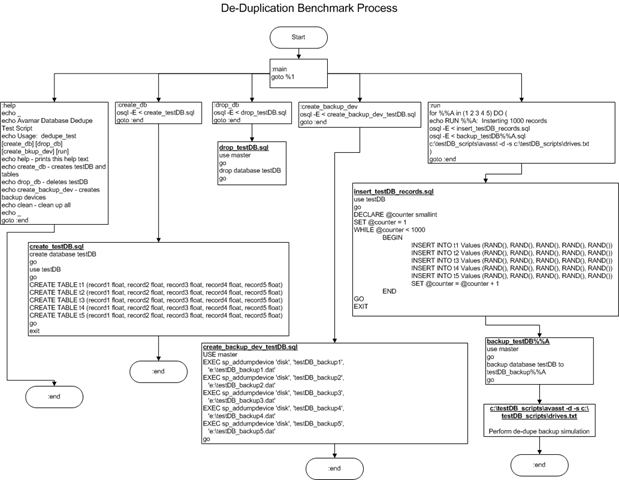
In the interest of benchmarking de-duplication rates with databases I created a process to build a test database, load test records, dump the database and perform a de-dupe backup using EMC Avamar on the dump files. The process I used is depicted in the flowchart below.
1. Create a DB named testDB
2. Create 5 DB dump target files – testDB_backup(1-5)
3. Run the test which inserts 1000 random rows consisting of 5 random fields for each row. Once the first insert is completed a dump is performed to testDB_backup1. Once the dump is complete a de-dupe backup process is performed on the dump file. This process is repeated 4 more times each time adding an additional 1000 rows to the database and dumping to a new testDB_backup (NOTE: this dump includes existing DB records and the newly inserted rows) file and performing the de-dupe backup process.
Once the backup is completed a statistics file is generated showing the de-duplication (or commonality) ratios. The output from this test is as follows:
You can see that each iteration of the backup shows an increase in the data set size with increasing commonality and de-dupe rations. This test shows that with 100% random database data using a DB dump and de-dupe backup strategy can be a good solution for DB backup and archiving.
Share and Enjoy
Cisco Nexus 5000 video from Nexus class lab
Here is a video from my Nexus 5000 lab, captured most of the session. You can view a high-res version of the video here. If you have not seen the Nexus 5000 in action this may be interesting.