DeWalt heading to McAfee
1

This video is funny and scary at the same time.
I came across a cool little Outlook calendar add-in called Datalens, the software was developed at the University of Maryland Human Computer Interaction Lab. The add-in greatly enhances the usability of the Outlook calendar.
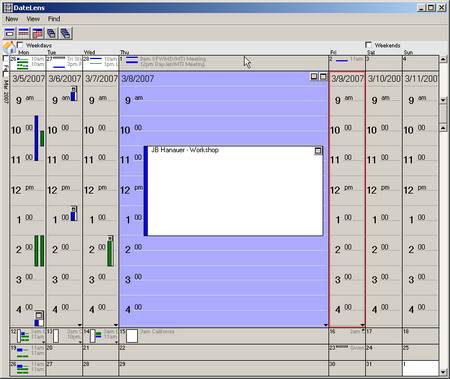
Another fine example of a Microsoft productivity tool. This video is absolutely hilarious. Thanks but I would rather use punch cards 🙂
Thanks you to my good buddy at http://vi411.org for sharing this with me.
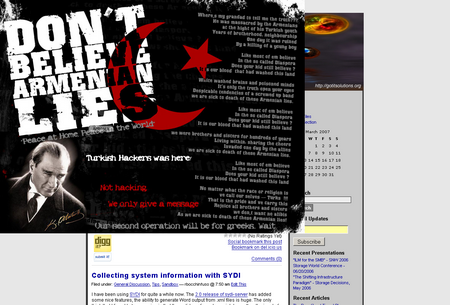
This morning I visited my site to find that a Turkish hacker decided to post some Turkish/Armenian propaganda. Interesting? Anyway, luckily the popup was embedded in a post and was fairly easy to find and remove.
So a couple of months ago or so I had the idea to test and document the use of rsych to replicate VMware virtual machines. Unfortunately my machine is running ESX 2.5.x and I had yet to upgrade to 3.0 so this information is a bit depreciated but I feel that it will be indicative of what I will see on ESX 3.0 (aka – VI3). On ESX 3.0 the process actually becomes much easier because all of the files (.vmx, .vmdk, .nvram) are contained in the same directory structure. So here is a simplistic representation of the commands required to replicate a VM on ESX 2.5, I am also in the process of building an automation script for ESX 3.0:
************ CREATE .REDO LOG ************
ware-cmd ~bocchrj/vmware/rh62_1/linux.vmx addredo scsi0:0
************ STARTING REPLICATION ************
rsync –verbose –progress –stats –compress /vmfs/VMs/rh62_1.vmdk esx2::rsyncVMs
************ REPLICATE VM CONFIG FILES ************
rsync –verbose –progress –stats –compress /home/bocchrj/vmware/rh62_1/* esx2::vmconfig/rh62_1
************ ADDING REDO.REDO LOG ************
vmware-cmd ~bocchrj/vmware/rh62_1/linux.vmx addredo scsi0:0
************ COMMITING REDO LOGS *************
vmware-cmd ~bocchrj/vmware/rh62_1/linux.vmx commit scsi0:0 1 0 1
vmware-cmd ~bocchrj/vmware/rh62_1/linux.vmx commit scsi0:0 0 0 0
************ DONE ************
The process worked well. I captured the output of the initial rsync and the second rsych cycle below:
Initial rsync cycle
Number of files: 1
Number of files transferred: 1
Total file size: 419430912 bytes
Total transferred file size: 419430912 bytes
Literal data: 419430912 bytes
Matched data: 0 bytes
File list size: 30
File list generation time: 0.152 seconds
File list transfer time: 0.000 seconds
Total bytes sent: 85826493
Total bytes received: 38
sent 85826493 bytes received 38 bytes 432375.47 bytes/sec
total size is 419430912 speedup is 4.89
Second rsync cycle
Number of files: 1
Number of files transferred: 1
Total file size: 419430912 bytes
Total transferred file size: 419430912 bytes
Literal data: 1864192 bytes
Matched data: 417566720 bytes
File list size: 30
File list generation time: 0.135 seconds
File list transfer time: 0.000 seconds
Total bytes sent: 344586
Total bytes received: 143405
sent 344586 bytes received 143405 bytes 4337.70 bytes/sec
total size is 419430912 speedup is 859.51
Looking forward to getting sometime to play with this on ESX 3.0, I am lobbying hard for the 48hr day 🙂
Ever feel the need to mount a Windows or Linux .vmdk on windows, I have. Here are a couple of utilities that make it possible to open Linux and Windows .vmdks on Windows in read-only mode or read/write mode.
Virtual Disk Driver for Windows (http://chitchat.at.infoseek.co.jp/vmware/vdk.html)
Ext2IFS – Ext2/3 file system driver for windows. Required to mount Linux Virtual disks on windows (http://www.fs-driver.org/index.html)
I have been using SYDI for quite a while now. The 2.0 release of sydi-server has added some nice features, the ability to generate Word output from .xml files is huge. The only think that I found to be annoying is that the sydi-transform.vbs script does allow the input of an entire directory.
cscript.exe sydi-transform.vbs -xServer.xml -sServerhtml.xsl -oServer.html
This can make the transformation process from .xml to .html fairly labor intensive for a large environment. This little script solves that problem.
#!/usr/bin/perl -w
# syntax: perl transform.pl dir_where_xml_files_live
# e.g. – perl transform.pl ./xmlfiles
# Will walk the file system and output filename.xml.html for each .xml file
#
# Edit these variables to match the location on your system
$pathtotransform=”g:/sydi/tools/sydi-transform.vbs”;
$pathtoxsl=”g:/sydi/xml/serverhtml.xsl”;
#DO NOT EDIT BELOW THIS LINE
$dirtoget=”$ARGV[0]”;
opendir(IMD, $dirtoget) || die(“Cannot open directory”);
@thefiles= readdir(IMD);
closedir(IMD);
foreach $f (@thefiles)
{
unless ( ($f eq “.”) || ($f eq “..”) )
{
system “cscript $pathtotransform -x$f -s$pathtoxsl -o$dirtoget\/$f.html”;
}
}
It has been a few weeks since my last post. I have been really busy kicking off a new initiative and working on a number of other projects. I am knee deep in a VMware replication whitepaper which is slow going just because of all the documentation and my home lab just is not really equipped enough to handle all the things I want to try and document. In my next few posts I will provide some of details that will eventually be found in the complete whitepaper. Anyway, just wanted to let everyone know I am still alive.